Formulas
The formula editor is where you build logic for your website in Nordcraft. It provides a powerful way to transform data, perform calculations, and implement conditional logic throughout your project.
Use formulas in Nordcraft to:
- Build logical operations
- Transform data
- Filter and search data
- Carry out mathematical calculations
Most formulas in Nordcraft are pure functions. A pure function always returns the same result for the same input values, and does not change anything outside of itself.
The formula editor
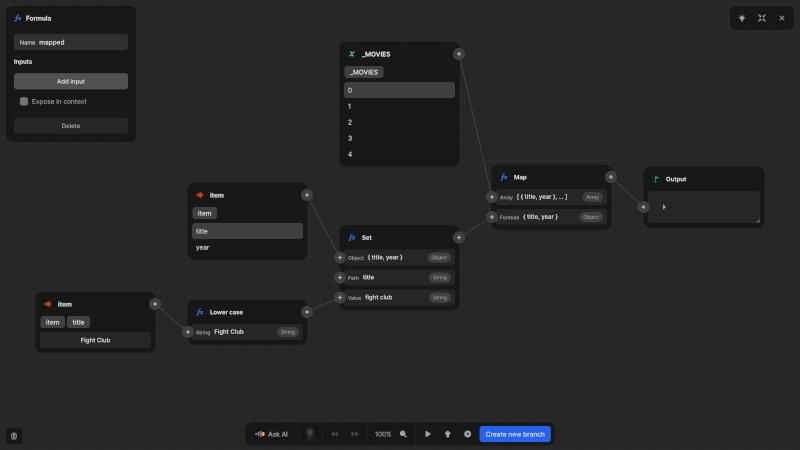
You can use the formula editor wherever you see the fx button in the Nordcraft editor, including:
- In the attributes panel when binding values
- In the CSS variables panel
- In the data panel when defining formulas
In the formula editor, you can:
- Reference variables, attributes, and other data
- Use built-in functions and operators
- See a live preview of the formula output as you type and edit your formula
Full-screen mode
For larger formulas, Nordcraft provides a full-screen view of the formula editor. To open the formula editor in full-screen mode, click the four-arrow icon button in the top-right corner of the formula editor.
Formula foundations
Built on the same concepts as the web platform, Nordcraft offers many built-in formulas that align with similarly named JavaScript functions. It's recommended to learn about the following JavaScript concepts to get to grips with the formula editor in Nordcraft:
- Array methods (map, filter, reduce, etc.)
- Object methods (keys, values, entries, etc.)
For a guided tour of the formula editor, check out the following lesson from the Nordcraft Fundamentals video course.