Page configuration
To configure page settings and metadata, open the page from the project sidebar and click on the Page section at the top of the right data panel in the editor.
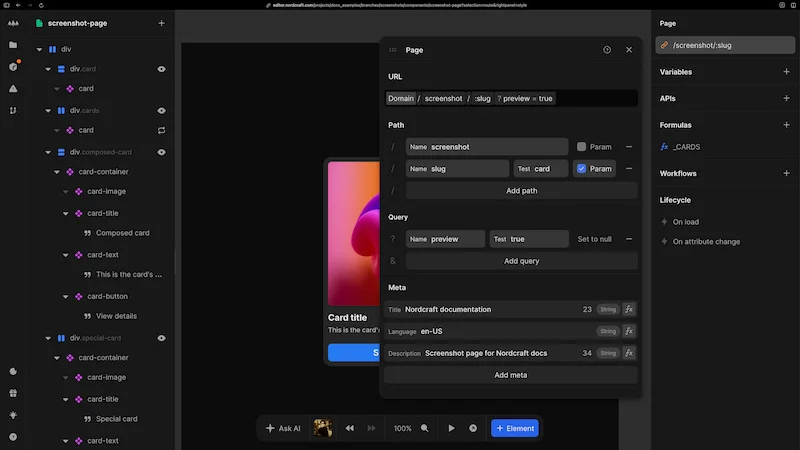
URL structure
At the top of the page configuration panel, you will see a URL preview showing how the page URL will appear in the web address bar of a browser, including domain, path segments and query parameters.
The URL configuration is divided into two main sections:
Path
- Add path segments by clicking the Add path button
- For each path segment, provide a name
- Enable the Param checkbox to make a path dynamic
- Set a test value for development purposes
- Remove paths using the - button
Query
- Add query parameters by clicking the Add query button
- Name your parameters
- Set a test value for development
- Enable Set to null option when appropriate
- Remove parameters using the - button
If you are not familiar with URL structure, check out the blog post about URLs.
Metadata
Each page on your website should have unique metadata for good search engine visibility:
- Title: Appears in browser tabs and search results
- Language: Specifies the language of your page content for accessibility purposes
- Description: Appears in search engine results and social media shares
You can bind any metadata value to formulas and variables by clicking the fx button next to each field.
Custom og:* meta tags which power Open Graph social sharing information are available on upgraded Nordcraft projects only.
Head elements
Sometimes you need to add external resources to your page, such as third-party scripts or custom fonts.
In the URL panel under Additional head elements, you can:
- 1Choose the resource type from the dropdown (script, meta, link, style or noscript)
- 2Provide content or reference external resources
- 3Set additional attributes for the resource
- 4Add multiple resources by clicking Add element to `<head>`
- 5Drag and drop to reorder elements if needed
Any scripts you add will have full access to your page data. Make sure you trust the source of the script before adding it to your website.
When adding custom fonts or other resources, consider the impact on page load time. Each additional asset increases loading time and may affect page speed and user experience.