Repeat formula
Using the repeat formula, you can create multiple instances of an element based on a set of data. This enables you to build dynamic lists, grids and other repeating UI structures without needing to copy and paste elements or components.
The repeat formula:
- Creates a new element for each item in a data array
- Makes the current item available as
Itemwithin the repeated element - Automatically updates when data changes
- Can be applied to any element or component
Using the repeat formula
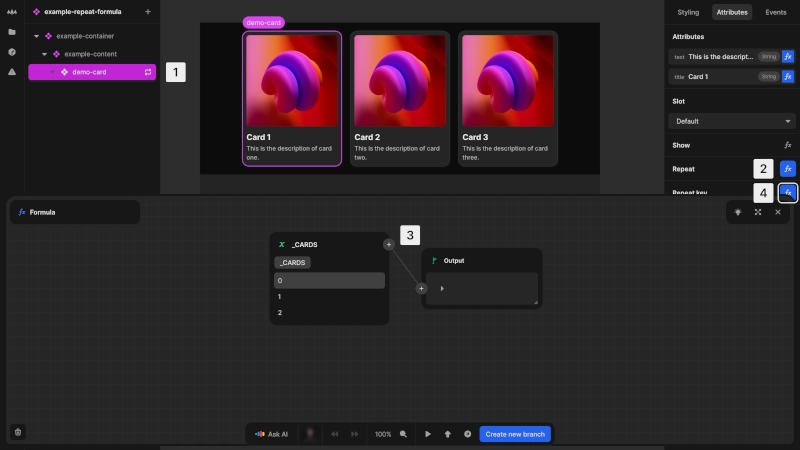
To create dynamic content with the repeat formula:
- 1Select the element you want to repeat
- 2In the attributes panel, click the fx button next to Repeat
- 3Enter a formula that returns an
Array; the element will be repeated for each item in the array - 4Set a Repeat key
The output of your repeat formula must be iterable (an Array of items).
Accessing data in repeated elements
Using the repeat item variables you can customize each item based on its data and position.
Within repeated elements, you can access:
Item: The current item from the arrayIndex: The position of the current item (starting from 0)
Creating numeric ranges
Optimizing performance with the repeat key
To ensure efficient updates and tracking of repeated elements, you can use a repeat key. You can use any unique identifier for an item's repeat key, such as a unique ID attached to the item if it is being fetched from a database. Alternatively, you can use the formula editor to build a formula that generates a unique identifier for each item, for example list-item-{id}.
Using the index as a key prevents Nordcraft from making optimizations. Use a unique identifier, like a database ID or content hash. Duplicate keys disable performance optimizations.
How the repeat key improves performance
The repeat key formula improves performance of your project in several ways:
- Enables Nordcraft to track specific items across renders
- Allows reuse of page elements instead of recreating them
- Prevents unnecessary re-rendering of unchanged items
- Maintains element state when items change position
This is especially important when:
- Working with large data sets
- Implementing drag-and-drop reordering
- Frequently updating or filtering data
- Adding or removing items from the middle of a list