Elements
Elements in Nordcraft can be HTML elements, text elements or components. Elements are the basic building blocks of your pages and components, creating the structure, content, and interactive parts of your website.
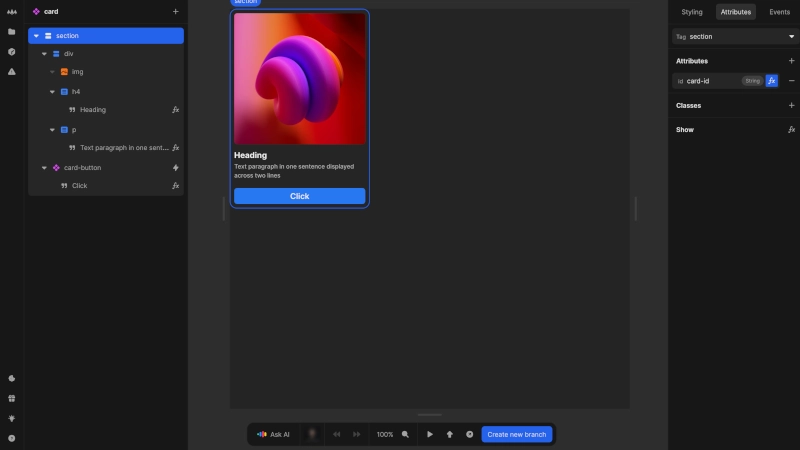
Elements exist in a hierarchical structure. Each element, except for the root (top-level) element, has a parent element, and most elements can contain children elements. This parent-child relationship creates what we call an element tree, with ancestor elements containing descendant elements.
Types of elements
There are three types of elements that you can add to your pages and components:
HTML elements
HTML elements are the most common type of element used in Nordcraft. These elements are native to the browser, which means the browser understands how to render and interact with them by default.
HTML elements are identified by their names or tags, each with specific meanings and behaviors, for example:
- Some tags like
<video>,<audio>, and<img>have built-in functionality for displaying media - Tags like
<button>,<input>, and<select>provide default functionality for user input and interaction - Tags such as
<h1>,<header>, and<li>have semantic meaning that communicate the purpose of the content - Some HTML elements, such as
<img>,<input>and<br>, are void (self-closing) and cannot contain child elements - see void element on MDN
Nordcraft uses standard HTML elements. If you already know HTML, you know how to work with HTML elements in Nordcraft. For comprehensive information about HTML elements, visit the HTML Elements reference on MDN.
HTML element attributes
HTML elements can be configured using attributes. HTML attributes provide additional information to the browser about functionality and how you want the element to behave:
- Common attributes like
idandclasscan be applied to nearly all elements - Element-specific attributes like
srcfor media elements ortypefor input elements define their unique properties
You can add, edit or remove attributes on an HTML element in the attributes panel of the element panel.
For HTML element attributes that traditionally don't require a value to be specified (such as open for <details> and <dialog>, or readonly for <textarea>, add the relevant attribute to the element and set the value to true.
For a complete list of HTML attributes, refer to the HTML Attribute reference on MDNs.
HTML element events
HTML elements can respond to user interactions through events. You can listen to all standard events on any element, and the editor allows you to add non-standard events if needed.
Events are configured in the events panel of the element panel.
If you're familiar with JavaScript event listeners, these are the same as events in Nordcraft. For detailed information about all available events, see the Events reference on MDN.
Text elements
Text elements in Nordcraft are specialized elements designed specifically for displaying text content only.
Text elements:
- Can contain text only
- Cannot have child elements
- Do not have attributes
- Cannot trigger events directly
- Inherit text styling from their parent element
- Cannot be styled directly
- Can be conditionally displayed using the show/hide formula
Components
Components are reusable elements that have their own structure, styling and behavior. They can be configured through using component attributes, styled with CSS and CSS variables, and can emit events to communicate with parent elements and pages.
For more information, see the components description in building blocks and the Components pages of the documentation.